Compatible with Chrome and Edge
Instruction Guide
We have a simple tutorial guide which explains the features of the software extension and what each button inside the extension does. Read our tutorial and welcome guide on how to use the extension to the fullest. Use all the features of this browser software.
If you are interested in other web extensions to install, you might wish to check out the Microsoft Bing Search with Rewards extension.
Microsoft Bing Search with Rewards Extension
It allows you to complete daily offers to get points.
Track the number of points you have currently and the rewards you can redeem with these points.
The ways to get points & get rewarded is search with Bing, browse with Microsoft Edge and shop at the Microsoft and Windows stores to earn rewards.
Sponsored Link:
Other useful extensions
Another extension which would be useful to install is the iCloud bookmarks extension.
It allows to keep your Chrome bookmarks on Windows synced up with the Safari bookmarks on your iPhone, iPad, and Mac.
iCloud will store your website bookmarks so it is accessible even on your iPhone and Mac.
Try these other two extensions and see if it will boost your daily productivity.
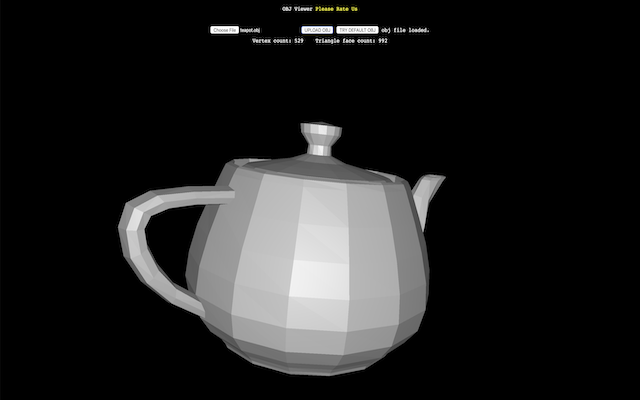
Want to view your 3D files quickly and easily. Please use our app. You don't need to install and spend too much time, just drag and drop and you can view them or you can open from your Google Drive.
Features:
After installing the extension. You click on the icon and can start opening OBJ files.
OBJ files are 3D objects that can be imported into a variety of programs. They are widely used by game developers, but they're also used to create 3D models for use in movies, TV shows and video games. You can learn more about the format on the OpenGL website.
OBJ files are typically created in programs like Maya or Blender, then saved as OBJ. If you've ever watched an animated film, you've probably seen an OBJ file in action without realizing it — they're often used to animate characters and other objects in 3D space.
The following software programs can open or convert OBJ files:
Blender is a free and open source 3D animation suite. It supports all major operating systems. Blender is available for Windows, Mac and Linux platforms.
Download the Converter from the Adobe website if you want to convert 3D objects into PDF format.
If you want to convert your 3D object into a PDF file, then you first need to download the free converter from Adobe's website. You can do this by visiting http://www.adobe.com/support/converter/
Tutorial:
- Install the Extension
- After installing the extension, click on the icon on the toolbar.
Sponsored Link: